



Microsoft Office 365 for Individuals is designed to save you time and make working with documents faster. Thanks to the extremely clear interface, the control is maximally intuitive and at the same time optimized for touch and stylus control.
With Office 365 for individuals, you get:
- Easy installation of familiar Office 2016 applications, such as Word, Excel, PowerPoint, OneNote, Outlook, Publisher and Access on 1 computer or Mac, 1 tablet and 1 phone with the operating system, which you prefer (iOS, Android).
- 1 TB capacity on OneDrive cloud storage, from where your files are available and synchronized on all devices.
- 60 minutes per month for calls to landlines or mobile numbers via Skype.
- The latest versions and exclusive features of applications with only an Office 365 subscription.
- For non-commercial use only, a new 1-year subscription, or a renewal of your existing Office 365 subscription.
The ideal office suite
With Office 2019 software, you can manage all today' s office agenda, including communication with authorities . You can even open a PDF file and edit the content or align images and diagrams with minimal effort. You can also use the integrated translator, dictionary and spelling corrections to check the composition of the sentence.
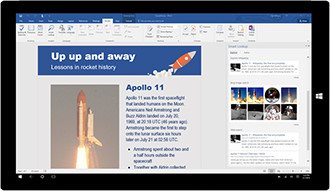

Easy cooperation
Don' t be limited by the old rules and feel free to edit documents in multiple people at once . All you need is a specific document to be located on the OneDrive cloud storage.
OneDrive storage
The OneDrive cloud storage basically offers you a whole 1 TB of data space. You can easily share files or access them from anywhere . Feel free to use your smartphone. You will never lose your data again, you will always find it on your OneDrive.
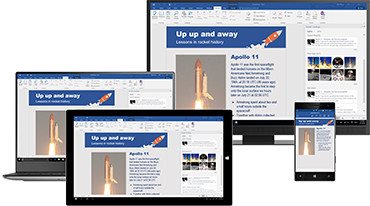

Always up to date
With an active Office 365 subscription for home, you no longer have to worry about upgrading Office, because you' ll always have the latest Office applications, features, and services.
Word
Word is without a doubt the most widely used text editing application. Not only can you easily create lyrics, but you can also easily share them with friends or business partners. In addition, more than 40 categories of full professional templates are ready for everyday use. Perfect cooperation with objects from other Office applications is a matter of course.
Excel
In Excel, numerical and textual data can be organized into clear tables or graphs in an instant. When you see them in context, you will make better decisions. Thanks to the division into rows and columns, you can add data in various ways, sort them, filter them, create tables or graphs from them with an interesting and attractive appearance.
PowerPoint
With Microsoft PowerPoint, you can create impressive presentations full of interesting effects with complete ease. Collaborate on a single presentation in a larger team using OneDrive cloud storage. During the presentation itself, you always have the necessary notes available via the virtual screen.
OneNote
You can draw, handwritten, enter keyboard notes, or click or drag to add notes in OneNote. Notes are saved, searchable, and synced with OneNote on other devices.

Outlook
The well-known Outlook environment will offer you a professional solution for your work agenda. You will have not only e-mails, but also shared calendars, tasks and contacts together.
Publisher
Print and share professional-looking publications. The publisher will intuitively guide you through the creation of business cards, brochures, but also web pages. Intended for PC only.
Access
Create your own databases and make full use of your data. Intended for PC only.
