
Reviews ASUS ROG Xbox Ally X
Interested in reviews of ASUS ROG Xbox Ally X? It got 4.5 out of 5 stars from our customers. Find specific customer reviews of ASUS ROG Xbox Ally X below. We will appreciate if you also share your experiences with ASUS ROG Xbox Ally X after purchasing.
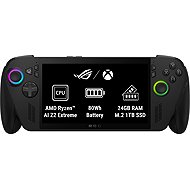
ASUS ROG Xbox Ally X
Discontinued

Jaroslav, Tehov
Rated 21/06/2026, variant ASUS ROG Xbox Ally X
Verified purchase - review from a price comparison website
It’s not an XBOX, it’s a winous. Synchronisation isn't working between the Xbox and the PC
0 ×Report
Automatic translation

Jakub, Jihlava
Rated 26/03/2026, variant ASUS ROG Xbox Ally X
Verified purchase
Plastics squeak and rear triggers squeak on the vast majority of devices. You can also add a mechanical keyboard eraser to the handheld and count on splitting the rear blanket.
performance and ergonomics
tragic processing
0 ×Report
Automatic translation
David, Nezamyslice
Rated 19/01/2026, variant ASUS ROG Xbox Ally X
Verified purchase
Super performance
Super packs and controller, you can see the work of XBOX
1TB SSD
24GB RAM memory
Super speakers
Fingerprint reader
Windows 11
You have everything there, even games that don't go on the steam deck
It is still windows 11 (you can put dual boot or "steamos"
It took 3 hours to update and you have to update in 4 different apps
If you're not the technical type and don't want to fiddle with settings, this is not for you. If you turn it on and go straight to play you'll be at about 70% performance
It's still windows and sometimes it's clumsy
0 ×Report
Automatic translation

Jan, Most
Rated 12/01/2026, variant ASUS ROG Xbox Ally X
Verified purchase
For me, a great toy for players who don't go crazy from the first setup. There's nothing like crawling under a blanket on the couch and getting comfy on this Asus beast.
very good ergonomics if you have slightly larger hands, maybe worse for ladies/women
Good sound, very loud speakers (most of the time I don't go to 20 out of 100 in volume)
No need for a dock, if you use a monitor or docking station the upstream works on it
WIN11 for more experienced users the initial setup is not painful at all, it just takes quite a long time ( there are tutorials on youtube if needed)
Performance-wise, you just need to set the graphics correctly and you can play almost anything with it (on such a small display, it's not a problem to lower the resolution to 720p)
Great to help dispose of the accumulated games in the library
I'm just gonna unlock and play
Availability of platforms like steam, epic games, GOG, ubisoft, Xbox game pass
Can expand SD card storage, for older titles perfectly fine, I haven't noticed any issues with sd card speed when playing
Nice RGB
For the more experienced WIN11 user, an absolutely awesome experience I recommend
Possible to do "Debloat" using script to slightly increase performance
The big advantage is that if anything happens you can do an option in the ASUS cloud recovery bios and reinstall the entire handheld "to factory settings" and start over: )
Personally I'm comfortable with Win11 I know exactly what to do and when I don't know which way to go I plug in the mouse and keyboard through the dock and do what I can/need/want and then just switch back to "full screen gaming mod"
Relatively good battery life. Playing an older darksiders title, I got to almost 4 hours of gameplay.
Volume of action buttons, especially X, A, B, Y
The paper stand is a mockery
Updates and the amount of them were a problem, but now fewer are coming out and it's okay
discharges relatively quickly despite "sleeping"
It doesn't come with a travel case or anything like that, I recommend getting a killswitch from Dbrand
Occasionally, after locking while the game is running, the controller buttons do not respond. You must restart the game or console. (so far it has happened to me about 2 times in 2 months)
Relatively small drive, but from what I understand ASUS has its own instructions for replacing the SSD with a larger one
The setup is a bit more complicated due to win11 updates, armoury crate and myAsus, but it can be survived, it's more of a labour pain for the first hour or two, then you don't touch it anymore
I recommend after installing updates etc. calibrate everything before playing, especially the levers. I had the first problem without calibration that one lever kept running a little to the left
The console requires a reset when switching to full-screen play mode and is needed for a little extra performance

0 ×Report
Automatic translation

Anonymous customer
Rated 19/12/2025, variant ASUS ROG Xbox Ally X
Verified purchase
Works like a Charm
Sucks that it does not come with some carrying case
0 ×Report

Customer, Praha
Rated 20/11/2025, variant ASUS ROG Xbox Ally X
Verified purchase
Výkon
Xbox Full Screen Experience takže vůbec není potřeba používat Windows
Všechny aktualizace jsou dostupné v Armory Crate SE a také přes tlačítko Xbox → Nastavení → Další nastavení → Nastavení Windows.
Game Pass
Ergonomie a rozměry
Kvalita Zvuku
Výdrž baterie od 2.5 do 6-7 hodin
Joysticky a hlavní tlačítka jako na ovladači Xbox
Velmi tichý v režimech 13W a 17W. Při 25 W je trochu hlučnější, ale stále vůbec ne hlasitý
Umístění tlačítek na zadní straně je zvláštní
Dlouhé úvodní nastavení
0 ×Report
Anonymous customer
Rated 04/11/2025, variant ASUS ROG Xbox Ally X
Verified purchase
The console is great, you can play even the latest games on it and the cooling is relatively quiet even at the highest performance. The Xbox interface is nice too, you don't have to go to the Windows desktop at all unless necessary.
Power and quiet cooling
Decent sound from the integrated speakers
Xbox interface
Full-featured Windows, so it's no problem to run anything, like on a classic PC
Lasts quite a long time on battery, depending on the selected performance profile
Power adapter included in the package
Full HD resolution - absolutely sufficient for games given the size of the display
The Xbox interface automatically loads games from Steam and other launchers so you have everything in one place
It feels good in the hand, the controls are also well placed
Fingerprint unlocking
No packaging, only a paper stand (better than nothing)
Bezel around the display - the display could have been a little bigger
When you want to install all the updates, you need to go to Windows Update, MyASUS, Armoury Crate and Microsoft Store. I wish it was all in one place. But that's just the way it is in Windows.
Initial commissioning and setup takes time
Game Pass Premium for 3 months free sounds nice, but it doesn't include the latest games
0 ×Report
Automatic translation

Naděžda, Praha
Rated 23/10/2025, variant ASUS ROG Xbox Ally X
Verified purchase
After Steam Deck, it's the second handheld I'm keeping. I tried MSI CLAW A8, the fan was extremely noisy, processing cheap. The only advantage was a larger display.
Execute!
ergonomic
flashlight
at 17W it has almost the same performance as at 25 or 35W unbelievable!
disk speed
silent fans
xbox setup, but it still needs to be improved
windows, now and then something crashes, a window pops up, etc.
I was expecting to get game pass ultimate, premium on pc is not interesting
0 ×Report
Automatic translation
Anonymous customer
Rated 21/10/2025, variant ASUS ROG Xbox Ally X
Verified purchase
Windows
Runs all games
Xbox apps
Perfect hold
Quiet
Battery life
Other stores outside of Xbox are harder to control with a controller (if at all)
Sometimes the menu gets stuck
Initial setup of Window and stores takes longer
0 ×Report
Automatic translation
Customer, Pardubice 3
Rated 21/10/2025, variant ASUS ROG Xbox Ally X
Verified purchase
update after a period of use: the joystick feel is perfect, the shape fits me better than regular controllers. Updates are gradually being added as expected. Performance in games can be well optimised (e.g. stellar blade even in high quality gives to 120 fps?!, hades 2 on silent mode and max is practically not moving from 120)
build
performance
the possibility of running linux alongside win (currently you are using it)
handheld pc
xBox in the title is a bit misleading
0 ×Report
Automatic translation