
Reviews GIGABYTE X870E AORUS PRO ICE
Interested in reviews of GIGABYTE X870E AORUS PRO ICE? It got 5.0 out of 5 stars from our customers. Find specific customer reviews of GIGABYTE X870E AORUS PRO ICE below. We will appreciate if you also share your experiences with GIGABYTE X870E AORUS PRO ICE after purchasing.
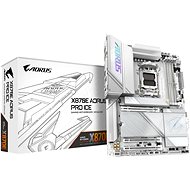
GIGABYTE X870E AORUS PRO ICE
Discontinued

Company
Rated 31/08/2025, variant GIGABYTE X870E AORUS PRO ICE
Verified purchase
Snow white, so as memory, GPU and cooler. A reasonable choice for the number of data lines. 2*40gbit USB in the front and 20gbit in the front. This makes it possible to clone NVME quickly. PCI5x16 is shared with 2*NVME and that's good, because we'll have PCI4x4 and PCI3x4 for decent 2*25Gbit networking and other stuff. Finally they don't cram PCI slots under the GPU anymore, but nicely underneath. The PROART boards are here. There's also SPKR, thermal inputs and even a microphone to measure fan volume. The BIOS doesn't seem to be complete, missing S3-S4 configuration, USB power options in sleep, wake up, etc. You can't even get into it in Fast mode - POST is too fast. Otherwise everything runs with 9950X+XMP+CO this time with absolutely no problems, AM4 had problems for a few years. Hopefully Zen6 (or possibly. Zen7), where they will of course select only the better boards for the list.
White
0 ×Report
Automatic translation

Radek, Havlíčkův Brod
Rated 21/06/2025, variant GIGABYTE X870E AORUS PRO ICE
Verified purchase
Excellent board
0 ×Report
Automatic translation
Viktor, Rádlo
Rated 05/12/2024, variant GIGABYTE X870E AORUS PRO ICE
Verified purchase
board design definitely, I tuned the whole board to white around 9800X3D.
easy installation of the m2 together with the cooler
GCC - Gigabyte control center - you can adjust the color of not only the fans according to the rising temperature which is nice for tuning custom loop
non-continuous cpu, ddr5 etc. tuning options
AORUS AI SNATCH
board cooling, despite the water cooling of the CPU and GPU I am calmer when the memory and board are cooled slightly by air
the possibility to update the bios and test the board without installing additional components is good in view of the time you spend on wiring the whole assembly as in my case
well laid out connectors
in default settings can be run without any problem, I haven't had AMD in my home PC for over 20 years: ) so figuring out all the options to make it TOP is a decent task to start with. someone must really enjoy it and have the time
debug code on the board, D8 - "it is an incorrect password" amused me.: )
compactness with icue link
I would definitely go the way of recommended memories according to QVL, however the best ones with CL28 are not available on our market


0 ×Report
Automatic translation