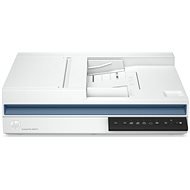
Interested in reviews of HP ScanJet Pro 2600 f1 Flatbed Scanner? It got 4.0 out of 5 stars from our customers. Find specific customer reviews of HP ScanJet Pro 2600 f1 Flatbed Scanner below. We will appreciate if you also share your experiences with HP ScanJet Pro 2600 f1 Flatbed Scanner after purchasing.
Rated 17/12/2025, variant HP ScanJet Pro 2600 f1 Flatbed Scanner
Verified purchase
After about two months of use, I'll try to return/recommend it. As far as the software is concerned, it is a problem to have one HP Scan for all devices. It's not optimized. There are 4 presets on the scanner - you can override them in HP Scan, but you can also delete them or make new ones - how do I know which preset belongs to which preset? This is not distinguished in any way. Automatic scanning using the buttons on the scanner often does not work. You need to restart the utility and then it will start. The stupid thing is that you only find out after a few seconds, because the scanner responds to the buttons after about 5 seconds and has no icon/diode to alert you that the scan is not happening.
HP Scan has a pretty nice feature, automatic naming of the scan by OCR. BUT! When you turn it on, automatic page turning is mandatory. This works so that about 1 in 10 pages turn upside down even when scanned correctly. So, 2 useless functions at once.
The software often blurs pieces of the document - randomly. I guess it has an anti-counterfeiting feature, but when it blurs e.g. the supplier's logo, barcode or even "Tax document" it's really stupid. HP Scan is set up by style - setup, sub-setup, sub-setup extension. So when you want to reconfigure something, you spend 10 minutes looking for where the feature actually was.
There is a one-sided/two-sided button on the scanner buttons. That absolutely does not work. If you avoid the quick options and want to scan with HP Scan, the program takes about 10 seconds to load. Why the hell not? Other printer/scanner software is just open right away.
Scanning really fast, ADF takes both pages at the same time (about 1.5 seconds per double page)
Software, they've screwed up everything they could
0 ×Report
Automatic translation
Eduard, Moravská Ostrava
Rated 22/11/2024, variant HP ScanJet Pro 2600 f1 Flatbed Scanner
Verified purchase
I'll come back to the review later not yet plugged in
0 ×Report
Automatic translation
Try our cookies
Alza.cz a. s., Company identification number 27082440, use cookies and other data to ensure the proper functioning of the website and, with your consent, also, among other things, to personalize advertising and the content of our websites. By clicking on the “I understand“ button, you agree to the use of cookies and the transfer of data regarding the behavior on the website for displaying targeted advertising on social networks and advertising networks on other websites.