
Reviews Mercusys MP510 KIT WiFi Powerline
Interested in reviews of Mercusys MP510 KIT WiFi Powerline? It got 4.5 out of 5 stars from our customers. Find specific customer reviews of Mercusys MP510 KIT WiFi Powerline below. We will appreciate if you also share your experiences with Mercusys MP510 KIT WiFi Powerline after purchasing.
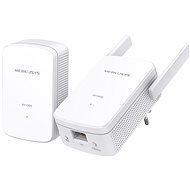
Mercusys MP510 KIT WiFi Powerline
In stock 5 pcs
56.90 €
Add to Cart

Filip, Kyšice
Rated 08/02/2026, variant Mercusys MP510 KIT WiFi Powerline
Verified purchase
Also works on another circuit on the same phase (different floor)
Very simple LAN setup
I set up the wifi via IP address and web interface and it works reasonably
When the vacuum cleaner is switched on, the internet transfer does not work
0 ×Report
Automatic translation

Matěj, Chyňava - Malé Přílepy
Rated 03/09/2025, variant Mercusys MP510 KIT WiFi Powerline
Verified purchase
Depending on the purpose for which you want to use this de facto mere WiFi "extender", it can be an ideal solution at a reasonable price, or it can also be broken. Definitely MP510 cannot be considered a full-fledged WiFi router or AP, the configuration options are minimal, basically just a MAC filter, some attempt at parental control (not really usable) and Guest network (it is usable). I bought it for my garden house/workshop, where WiFi from home can't reach, but where I have part of the data distribution solution using MP500 (i.e. the same powerline adapters, just without WiFi). The inability to set a static IP in the LAN I bypassed through static DHCP on the router. I have no complaints in terms of performance in relation to the parameters, rather the opposite. Yes, 5Ghz would be great, but for the price it's fine and in my workshop 2.4Ghz is enough. WiFi runs as expected from 2.4Ghz/40Mhz and due to the complex topology of the electrical network (25m from the MP500 connected in the house to the router, even 3 switchboards along the way) absolutely above expectations around 80Mbps+. So I have wireless coverage of the workshop and garden with speeds sufficient for 3 video streams in 4k quality without any problems. Otherwise, the first setting is a bit tricky. I already have 3xMP500 in my network, and adding MP510 was not without complications. 1. the first time I plugged in the adapter caught immediately, but it did not pair, the reason was quite funny - while the MP500 switches to pairing mode (the manual says "press the button for 1s") after a shorter (less than 1s) and longer (2-3s) button press, the MP510 needs only the shorter press, over 1s does not switch to pair mode. It took me about half an hour of debugging to figure it out. 2. when some changes are made to the settings - for me, for example, when changing static DHCP according to the MAC adapter on the router, turning WiFi Move off/on, changing SSID, etc. - it happened that the pairing with the source MP500 fell apart and I had to start again from resetting the adapters. But eventually it did and has been running perfectly fine ever since. I'll mention the WiFi Move function, it can be interesting for specific purposes. What does this function do? Well - if you have more than one of these powerline adapters, the ones where it's enabled makes it so that most of the changes in the settings (filters, wifi schedule, LED control, Guest network, etc. ) changes on one adapter are automatically written to all other MP510 adapters in your powerline network when saved. In fact, I'm strongly considering using this solution in my guesthouse, where I currently have 5 different wifi routers, 1 for home, 4 for guests, and managing them is sometimes annoying, especially when 3 of them are in forward mode, because there is no way to reasonably tighten the ethernet. So a powerline option for guests, where I could additionally easily extend the signal coverage (now missing for parts of the common areas, porch, etc. ) would be great. Unfortunately I haven't found the option to buy the MP510 separately, always just as a kit in a MP500+MP510 pair, which doesn't make sense (I would need one MP500 on the input from the main router and then ideally 5x MP510 for WiFi coverage. )
To sum up - for the purpose I needed to solve, this kit turned out to be actually an ideal solution with a great price-benefit ratio.
price
powerline speed and range in a rugged electrical installation
more complicated wiring procedure incl. WiFi AP setup
can't set IP on LAN
simplified functionality
can't do 5Ghz
0 ×Report
Automatic translation

Anonymous customer
Rated 28/07/2025, variant Mercusys MP510 KIT WiFi Powerline
Verified purchase
I was surprised that such a product even exists, pleasantly surprised. It serves a function, you get wifi to places where it gets weaker or not at all from the router. Then when you press the wps button on the router, it also sends the same signal as the router ( network name and password ) so you don't have to deal with anything after setup. Ideal for online gaming where you need a more stable ping.
the cable outlet improved my ping for gaming in a room where I had poor wifi coverage and I couldn't route the cable without having to do some complicated drilling
after setting up it spreads the same wifi as the router, if you don't set it up it will spread its own wifi to access it you can find at the bottom on the label ( I had 30 mb in the room and now I have 120mb
pretty easy to set up even with the same wifi setup it took me about 20 minutes, I just ran around the house for a while looking for the nearest outlets for the initial pairing and when it was, I plugged it in as needed
price performance super
if you plug into a fork or extension the result is much worse than if you don't
0 ×Report
Automatic translation

Daniel, Hrabětice
Rated 11/07/2025, variant Mercusys MP510 KIT WiFi Powerline
Verified purchase
very good device so far, even the less skilled can put it into operation in a few minutes
very simple installation
where is the wifi access password?. MIKRO font on the spot.
sometimes it seems to fall asleep until it doesn't transmit
0 ×Report
Automatic translation

Viktor, Praha 1 - Staré Město
Rated 02/06/2025, variant Mercusys MP510 KIT WiFi Powerline
Verified purchase
works
0 ×Report
Automatic translation
Milan, Libochovice
Rated 02/06/2025, variant Mercusys MP510 KIT WiFi Powerline
Verified purchase
strangely enough, it works even with the old aluminium installation and the splitter..: )
0 ×Report
Automatic translation
Customer
Rated 30/03/2025, variant Mercusys MP510 KIT WiFi Powerline
Verified purchase - review from a price comparison website
The advantage is to get the Internet where you need it even in apartments where you cannot drill and cut (rental housing, condominiums. ), or it's complicated (garages, gazebos in the garden).
For wallboxes, IP cameras, solar inverters, etc. this is often the only possible solution. It is always necessary to try the transfer and experiment a bit with the choice of socket locations you connect to.
The Mercusys MP510 kit comes with everything you need, the primary MP510 and secondary MP500 unit, a patch cable and basic instructions - also in English. Detailed manuals can be downloaded easily from the manufacturer's website. On the primary unit there is an imprint on the fork side with the SSID name of the internal Wifi network setup and the password to this network. I recommend to take a photo before setting up. Basic setup - using the buttons to clone your home Wifi network via WPS works well, prioritizes the strongest WiFi network nearby, stay close to your home router. Manual setup via local network and internal http://mwlogin.net page has superior options such as guest network, DHCP options and manual IP settings, different Wifi network name etc. You must first set your own password for this setup. I recommend doing pairing and similar tasks on a table in a multiple extension cord, where the LEDs of both units are visible and the buttons are easily accessible. Pairing and setting up takes a little patience for time and knowing the functions and intricacies of the buttons well, you can accidentally turn off your WiFi network or reset the unit to factory settings. It depends on the lengths of the squeeze. For example. forced shutdown of the Wifi transmitter is indicated by a steady orange LED, WPS setup by flashing. When pairing, observe the sequence of pressing the pairing buttons, the green LEDs do not flash synchronously and do not light up to complete the pairing at the same time. You have to be realistic about the transmission characteristics, it is a high frequency transmission over high capacity power cables. Any inductance in series with a conductor (meter coil, circuit breaker, current protector) makes a large signal attenuation. Behind the suppression elements in the network (e.g. in suppressed extension cords and behind UPSes) the attenuation is fatal. If you have a three-phase network you have to connect to the same phase, otherwise the units do not see each other through the wire, but only through the capacitance in the parallel wires. Any interference in the network from appliances such as pulse power supplies, microwave ovens, commutator motors. overpowers the useful high-frequency signal from the units, the error rate and dropouts increase, therefore the link quality is not constant. The cable capacity and attenuation depends on whether the cables are flat or round, whether two wires go into the sockets ("aluminum distribution") or three ("copper distribution and extension cords"), whether there are multiple cables in the wall in parallel. It works, but realistically don't expect LAN cable quality and expect degradation based on the length of the power line and the level of interference on the network.
Mercusys MP510 confused me by the design of the primary unit with external antennas. I would expect them in a secondary unit, where I would expect better coverage of the remote area due to them, than better coverage of the area at the router. The password and SSID of the network is on the bottom, when the unit is switched on and therefore in a socket, you can't read them. Both buttons protrude, long pressing them can reset the unit to factory settings, this can be tricky. I have not found anywhere an indicative measurement of the quality of transmission over the powerline. I have long struggled with the problem that the Powerline units are visible, Wifi transfer of setup data from the home router via WPS to the primary unit works, manual setting of parameters via Wifi and http also works, the secondary unit sends the correctly copied network to the router, but the Internet from the router is still not transferred to the secondary unit. Only after connecting the router to the primary unit by cable everything works as it should. It just doesn't work without a cable to the primary unit. But I need Powerline for an application where the "home" router is Wifi only with no LAN socket (unique technology) and I am returning the device.
0 ×Report
Automatic translation
Pavel, Praha 5 - Zbraslav
Rated 18/11/2024, variant Mercusys MP510 KIT WiFi Powerline
Verified purchase
Surprise, it really works
Connecting, logging in, a few minutes
Nothing
0 ×Report
Automatic translation

Ludmila, Havířov
Rated 01/04/2023, variant Mercusys MP510 KIT WiFi Powerline
Verified purchase
It's working as it should.
0 ×Report
Automatic translation