

Reviews QCY T1C Black
Interested in reviews of QCY T1C Black? It got 4.4 out of 5 stars from our customers. Find specific customer reviews of QCY T1C Black below. We will appreciate if you also share your experiences with QCY T1C Black after purchasing.
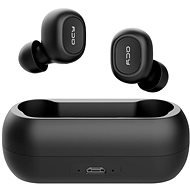
QCY T1C Black
Discontinued

Jaroslav, Ptice
Rated 13/08/2025, variant QCY T1C Black
Verified purchase
price performance
occasional pairing
0 ×Report
Automatic translation

Jan, Nové Strašecí
Rated 16/07/2025, variant QCY T1C Black
Verified purchase
sound great
short distance for bz
0 ×Report
Automatic translation

Jana, Ostrožská Nová Ves
Rated 28/06/2025, variant QCY T1C Black
Verified purchase
Great satisfaction with the purchased product
0 ×Report
Automatic translation

Vendula, Ústí nad Labem
Rated 25/06/2025, variant QCY T1C Black
Verified purchase
Both the headphones and the case have a terrible design, it's hard to tell if they are intentionally full of traps to necessitate early replacement or if this is the result of manufacturer disinterest. The case can not be closed, so it collects any mess that you just have in your pocket or backpack. Fortunately, it's pretty easy to clean. The headphones themselves have a tendency to get clogged with grease -> you need to clean them with a drop of hydrogen peroxide, which nobody tells you, you have to figure it out yourself: D
Surprisingly, for a couple of crowns they have a very good sound profile, which doesn't sound cheap like competitors in the same price range, for example the bass is better than airpods and techno sounds better in them; ) A guide to solving the most common problems: ------ A) One headphone sounds 50% (or significantly quieter) than the other.
Most often it does not play because it is clogged with earwax and dirt, just clean it -due to the design it is absolutely unavoidable and only superficially uncleanable, often it can not be seen with the naked eye because it is deeper in the mesh
First check that the handset is actually charged - due to the horrible design of the case, it happens that one of the charging contacts gets stuck and doesn't come out - again due to some mess - check that all 4 feet are out. Sometimes there is just a bad contact, push the headphones into the case and gently push to make sure both headphones have contact (light up). If the problem is not in the contact, the problem is in the sebum. Solution: 1)Get 3% peroxide (commonly found in pharmacy).
2) Remove the earbuds from the headphones, which can also be cleaned with peroxide or another silicone-safe substance.
3) Drop a drop of peroxide on the exposed mesh and lay the handset on its side (it should not leak in). Alternatively, it is possible to drip peroxide into the cap of a petcock and place the headphones in it with the mesh down, so that only the mesh touches the liquid.
4) Let it bubble for a few minutes, or add more peroxide if you have a lot of clogging, but usually a little is enough.
5)With a tissue (tissue paper, toilet paper), gently wipe the liquid from the handset and let it dry for a few more minutes Check if the problem is solved. If not, try again, it's possible they are very clogged. In most cases, I just clean the headphones and they work again. ------ B) Problem with the speaker diaphragm (low volume of one of the headphones)
these are cheap headphones, for some reason after about sometimes use the diaphragm (which is supposed to vibrate and transmit sound) somehow gets bent, this has only happened to me a few times Solution:
1) Take the earpiece, clean it, Take the earpiece with the speaker part (what normally has the silicone plug on it) in your mouth and blow gently but long - trying to keep constant pressure on the diaphragm and thus straighten it. Try to hold the pressure for about 30 seconds. See if that works. If not, try blowing from the other side (there is a small hole underneath the handset). Sometimes it happens that after blowing the earphone deteriorates, this tells you which direction the diaphragm is bent, so you then need to choose the opposite direction. When it does, the faulty headphone may sound louder than the other, but this evens out within a minute of listening. Why exactly, I have no idea, I have disassembled one handset and I am none the wiser. These methods have always helped me with the volume problem. I have had my headphones for over a year, I clean them with peroxide regularly about once or twice a week as needed. The volume problem occurs frequently on a regular basis, and it's almost always due to clogging. ------ C) Headphones unpair by themselves and do not pair
Also a common problem, the headphones don't always sit firmly in the case, i.e. they don't disconnect from the BT and instead unpair after some time Solution:
1) Unpair your device (turn off BT to be safe).
2) Slide both headphones into the case, check that they both have contact (light up).
3) Leave the headphones in the case, press the button on both headphones at the same time and hold (the manufacturer says 30-50 seconds) - they should both flash after some time. This resets their pairing.
4) After 50 seconds stop holding, remove both headphones for a few seconds and put them back in, they should be paired.
5) Take the headphones out of the case again, turn on BT on your device - you should see QCY_APP (we don't care) and QCX_T1C which should be paired headphones again. If that doesn't work, check that you don't have a flat case and try 2-3 more times. You always need to unpair the devices around the headphones, if one of the headphones connects to something else, it will no longer want to pair with the other headphone. They may be cheap headphones, but I am of the opinion that purchased electronics should last longer than two months, regardless of the purchase price. Then let them serve: )
cheap headphones with good sound profile
nice bass, a rarity in this price range
if you take care of them (clean them), they will last
I've had them for over a year and they play well
super headphones for DIY and technical types who enjoy solving small problems with electronics
figuring out how to solve the problems with the headphones gave me a lot of work, thanks to which I now have an emotional attachment to them and refuse to replace them
They can withstand a million drops on the floor and one drop into solidifying epoxy resin (and still play well)
the app supposedly sucks, it didn't even run for me, luckily it's not necessary to use it
terrible case design - can't close and gets clogged with junk
the mesh on the headphones gets clogged with grease and the headphones lose volume
the instruction manual is hard to follow and almost always a machine translation, I guess from Chinese
troubleshooting instructions (e.g. unpairing headphones) had to be dug up from the depths of foreign internet forums
bigger and a bit uncomfortable in the ear, who has smaller ears in it looks a bit like a pimp, but it can be
nothing for people who don't want to worry about their electronics
if you want a trouble-free appliance get headphones that are made to last more than a month
0 ×Report
Automatic translation
Company
Rated 22/06/2025, variant QCY T1C Black
Verified purchase
I've tried a lot of headphones and these have been the worst so far. I recommend to pay extra and buy Niceboy.
good control
the sound corresponds to the price (not very pronounced bass)
pairing with my phone stopped working after a couple of weeks and I couldn't reset it
0 ×Report
Automatic translation

Tomáš, Velká Bíteš
Rated 19/06/2025, variant QCY T1C Black
Verified purchase
one earpiece stopped working
a crappy app that doesn't actually do anything
0 ×Report
Automatic translation

Customer, praha
Rated 03/06/2025, variant QCY T1C Black
Verified purchase
After a week, the headphones desynchronized. Now only the left or only the right works, never both
0 ×Report
Automatic translation
Romana, Strážnice
Rated 20/05/2025, variant QCY T1C Black
Verified purchase - review from a price comparison website
OK
0 ×Report
Automatic translation
Jan, Beroun
Rated 10/05/2025, variant QCY T1C Black
Verified purchase
price
0 ×Report
Automatic translation

Jakub, Sněžné
Rated 06/05/2025, variant QCY T1C Black
Verified purchase
At first the headphones worked nicely, but quite often they like to cancel pairing with each other and you then have to listen from only one headphone, or try to pair the headphones again, which is a nerve-wracking and very long process, given that the headphones absolutely do not do what the instructions say they should do.
ok sound
They like to get pissed off
Re-pairing is a nerve-wracking process
0 ×Report
Automatic translation