

Reviews Razer Naga Pro
Interested in reviews of Razer Naga Pro? It got 4.2 out of 5 stars from our customers. Find specific customer reviews of Razer Naga Pro below. We will appreciate if you also share your experiences with Razer Naga Pro after purchasing.
Razer Naga Pro
Discontinued

Anonymous customer
Rated 17/10/2025, variant Razer Naga Pro
Verified purchase
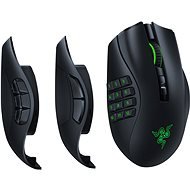
The swap-able side panels are nice
Love how it's configurable for different games (when it actually works)
The side panel buttons sometimes just stop working altogether and has to take off the side panel then put it back on to get it working again
The program frequently forgets to change profile to the specified game (this is happening since the latest software update)
THE SCROLLING WHEEL IS STRAIGHT- awful. Just within a few weeks of using it, the mouse started producing these "phantom scrolls" (sometimes it starts scrolling in the other direction) and lately (about a year later) the scroll click either don't work or double clicks
The wireless mode (both the 2.4GHz one and the bluetooth mode) only works when the mouse has a good day otherwise it's often delayed or just don't work at all.
With all these negatives, it's (or well, it was) overpriced.
0 ×Report

David, Kvasice
Rated 29/11/2024, variant Razer Naga Pro
Verified purchase
It's working as it should.
Interchangeable sides of the bump
Colour
Super hold on
Charging usb-mini(like on an old phone), that's something that doesn't go over my head or anything. plus it's got its own notch and you can't use any other USC cable. Nonsense. Why! Proooooc! my nerves
0 ×Report
Automatic translation

Martin, Brno 14
Rated 06/09/2024, variant Razer Naga Pro
Verified purchase - review from a price comparison website
a little expensive
0 ×Report
Automatic translation
Anonymous customer
Rated 12/05/2024, variant Razer Naga Pro
Verified purchase
After using it for a year I can't think of anything to complain about
The plate with 12 buttons on the side is unexpectedly convenient: didn't think I'd ever use more than 6 of them but I ended up constantly using from about 8 up to all 12 of them, depending on current interests, option to bind macros occasionally helps a lot
After a bit over a year the scroll got all wonky, will have to fix it under warranty
0 ×Report
Automatic translation

Petr, Kralupy nad Vltavou 1
Rated 29/03/2024, variant Razer Naga Pro
Verified purchase
I've been using this mouse for years, first in the version with the cable and now without it, and I can't praise it enough.
Multiple wireless connectivity options
Several button options
Probably just the price
0 ×Report
Automatic translation

Customer, Praha
Rated 27/03/2024, variant Razer Naga Pro
Verified purchase
One of the few mice on the market that provides so many buttons in a wireless connection
For me, literally incomparable ergonomics
The software allows almost anything the user can think of
Both USB, 2.4GHz and Bluetooth connectivity (switching possible on the fly)
Possibility of power supply via power HUB
Not the cheapest by far, but the price is fully justified
Power supply via Micro-USB
The power cord is very specifically shaped, so finding a replacement can be a challenge
Power HUB not included (although power supply via HUB is possible)
0 ×Report
Automatic translation

Ondřej, Praha
Rated 21/12/2023, variant Razer Naga Pro
Verified purchase
the mouse is great, but the package does not include the basic thing and that is the cable
once the battery runs out, you have nothing to charge it with. the cable is atypical and you have to buy a docking station for 1500, -
it's starting to resemble the Apple model, buy one thing and make it work, then buy two more overpriced ones
0 ×Report
Automatic translation
Martin, Kladno 1
Rated 11/12/2023, variant Razer Naga Pro
Verified purchase
I bought it for gaming, I'm a big fan of lighting so I don't appreciate it.
long battery life
I like that it has handles for the side buttons. but -> (in barrage)
possibility to set bind, macro, rpi etc.
the side variant with numbers 1 - 6 responds only when it wants to, when I put the keyboard shortcuts on it, one day it worked perfectly and the other day the buttons did not respond. the problem persists and I am unable to use the mouse to its maximum potential because of it. That's why I recommend the cheaper version without side buttons
0 ×Report
Automatic translation
Miroslav, Merklín
Rated 30/07/2022, variant Razer Naga Pro
Verified purchase
quality of workmanship
ergonomic
I could also use the docking station that was with another Razer mouse
exchangeable side panels, easy to change, holds firmly
software, synapse 3 i like: )
battery life
I like that the cape is not ultra light and weighs something
not USB-C
0 ×Report
Automatic translation
Vladimír, Praha 4 - Modřany
Rated 05/06/2022, variant Razer Naga Pro
Verified purchase
The cape is perfect, but unfortunately it has a so-called pre- and post-travel main buttons. It is a shame. It works. And it' s not just a problem with Razer, it' s with other manufacturers as well. There is nothing left but to return the cape.
Everything but cons
pre-travel main buttons
0 ×Report
Automatic translation