

Reviews 18.5" Acer PD193QE Dual Screen
Interested in reviews of 18.5" Acer PD193QE Dual Screen? It got 2.5 out of 5 stars from our customers. Find specific customer reviews of 18.5" Acer PD193QE Dual Screen below. We will appreciate if you also share your experiences with 18.5" Acer PD193QE Dual Screen after purchasing.
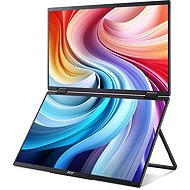
18.5" Acer PD193QE Dual Screen
Discontinued

Josef, Roztoky u Prahy
Rated 10/08/2025, variant 18.5" Acer PD193QE Dual Screen
Verified purchase
after delivery of the replacement power supply from Alza satisfaction. I'd close it like an ntv, put it in my backpack and I could work on the mountain. good monitor for office work. I would like to see the possibility of buying a cover.
when connecting USB C both panels work independently, with ntb so I have 3 monitors
good brightness, good sharpness for office work
good portability
after a complaint of missing power supply Alza delivered a replacement power supply
usb c power supply is not working, according to Acer the fault is in my ntb
the attached power supply has only us and uk connector and Acer is making excuses that the power supply should not be attached at all and the power supply should be only from the ntb via usb c
for better portability it would need a cover. 19" will not fit into a normal ntb case.
it wouldn't start when usbc was connected, it only caught on when hdmi was connected. Then the usbc worked.
0 ×Report
Automatic translation

Jiří, Havířov
Rated 09/08/2025, variant 18.5" Acer PD193QE Dual Screen
Verified purchase
Unfortunately, I see the monitor as a disappointment mainly because of the impracticality of always having to have an external power supply and the very low brightness.
The largest portable monitor on Alza
Matte finish but very low brightness
Automatically reverses the image when duplicating an image
The second monitor is high enough so that the bottom one is shaded by the laptop (14-15.6") when duplicating
Low brightness - not suitable for sunny days
No power on USB-C from laptop (tested both Macbook M1 Max and another laptop where Verbatim PMT-15 does not need external power)
The picture is blurry and hurts the eyes - basically the quality of the panel 10-15 years ago
There is no EU socket in the package - only UK and US, combined it can't tighten the laptop so you need to buy another power adapter
Samsung Dex doesn't work correctly in "fill" mode (both screens) and can't duplicate (only one monitor works).
Cannot pretend to be two independent monitors - either you have a duplication of the image, or one monitor in portrait mode ("fill" mode - stretching over both monitors)
0 ×Report
Automatic translation