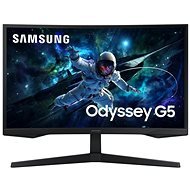
Interested in reviews of 32" Samsung Odyssey G55C? It got 4.5 out of 5 stars from our customers. Find specific customer reviews of 32" Samsung Odyssey G55C below. We will appreciate if you also share your experiences with 32" Samsung Odyssey G55C after purchasing.
we returned the goods-loose joint on the holder, return quickly without any problems. We subsequently purchased the same type and everything went without a hitch.
The size, which makes the curved design, is obvious, but some people may not like it because of the distortion of the image - I will get used to it myself. long
Size - at the game it devours
Resolution
The ability to easily update the monitor firmware - but unfortunately even the acute version does not solve the ailments.
Included cables both DP and HDMI
Even with the included cable, the monitor is not able to communicate the correct frequency and I had to force it through the card driver (RTX 4070S)
Enabling adaptive sync and VRR causes motion blur - so it means that a feature that is supposed to help is hurting.
Adaptive brightness is rather a slap in the face - it's almost impossible to see one bright object against a dark background just because the darkness is predominant at that moment.
It's not ready for universal VESA, which are ready for sizes larger than 75×75. These then rest on the plastic around the VESA threads as these are slightly recessed. Therefore, if the VESA bracket package does not include the demarcation pads, damage may occur.
When the signal is restored to HDMI, the DisplayPort also disconnects for a moment, so the other parallel monitor(s), which have nothing to do with HDMI at that moment, start flashing and the expanded desktop windows migrate because the monitor disappears from the system for that moment - why on earth?
When the monitor is completely switched off (by pressing the button), the monitor is completely disconnected from the system. This moves the contents of the desktop to the remaining monitor(s). This can cause problems when connecting to a PC via a remote connection such as TeamViewer, Chrome RD, etc., especially if this is your only monitor. At that point, you'll be connecting to a PC without a monitor and the remote control program won't know what to render and will cause problems. - Again: why on earth?
colours probably ok, you have to play around in the settings
dynamic brightness doesn't work very well
0 ×Report
Automatic translation
Try our cookies
Alza.cz a. s., Company identification number 27082440, use cookies and other data to ensure the proper functioning of the website and, with your consent, also, among other things, to personalize advertising and the content of our websites. By clicking on the “I understand“ button, you agree to the use of cookies and the transfer of data regarding the behavior on the website for displaying targeted advertising on social networks and advertising networks on other websites.