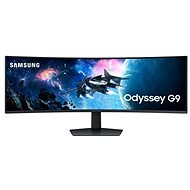
Interested in reviews of 49" Samsung Odyssey G95C? It got 4.0 out of 5 stars from our customers. Find specific customer reviews of 49" Samsung Odyssey G95C below. We will appreciate if you also share your experiences with 49" Samsung Odyssey G95C after purchasing.
I wouldn't play on a monitor smaller than 49 inches today. I'd prefer OLED, but those only come with 1800R curvature, which is useless for gaming once you get used to 1000R. The NEO QLED can also do black, which this monitor can't and is its only weakness, but the NEO only comes in a 57 inch version with a price tag elsewhere. So the choice fell on the G95C and I am very pleasantly surprised by the image quality in HDR. I have an OLED TV and the only difference at first glance is the worse blacks and viewing angles. Good job Samsung, at the current reduced price it's a total blast, ideal for work too, you don't have to worry about any image burn-in.
Surprisingly high HDR quality for a VA panel (1000 nits, VESA certified)
I have to reduce one star because sometimes it happens that when the computer goes to sleep or after a while of inactivity the monitor goes off, then after waking up the computer does not reactivate the signal. I also have the latest FW, but sometimes I have to restart my computer, because even if I try to unplug the monitor from the PC, turn it off and on, it still doesn't pick up the signal.
I also have the drivers and according to posts on the internet this is a common problem. It's quite awkward when you have something broken and then have to hard shut down the computer just to get the image to pop up.
I purposely didn't buy the OLED variant because 80% work and 20% gaming/movies. The windows desktop image with the bottom bar would burn out on my OLED variant monitor after a few months.
The picture is like a quality monitor. Of course, it doesn't reach the quality of OLED, but for a working monitor it's not that important.
I like the PIP option, which means that you can choose to have one video input go to the left half of the monitor and the other to the other half. You then connect the laptop with 2 cables (from the docking station) and the whole thing looks like 2 monitors. For IT work, this is better than virtually splitting the desktop into multiple parts, as many applications don't support this.
In games (the third video input from the gaming PC), the display at the limits of your peripheral vision draws you beautifully into the action as if you were in the game.
So for games, you need a better graphics card. 5120x1440 resolution, already needs performance, but can be solved by upscaling (AMD FSR / NVIDIA DLSS).
It also supports HDR in single-screen mode. This VA panel has much higher brightness than the OLED panel and is MATTE, so there is not as much of a glare problem. Watch out for the back light - the curvature acts like a parabolic mirror with a focus in your eye.
The monitor is giant and heavy, so it's not a big carry. I rate the fact positively.
The curvature is perfect for games
Resolution super
Can simulate 2 monitors side by side (PIP) - 2 inputs, each displayed on one half
Quality image
Matte display
Suitable for work
I guess the price of no
0 ×Report
Automatic translation
Try our cookies
Alza.cz a. s., Company identification number 27082440, uses cookies to ensure the functionality of the website and with your consent also to personalisage the content of our website. By clicking on the “I understand“ button, you agree to the use of cookies and the transfer of data regarding the behavior on the website for displaying targeted advertising on social networks and advertising networks on other websites.