

Fujifilm instax mini Link+ Black
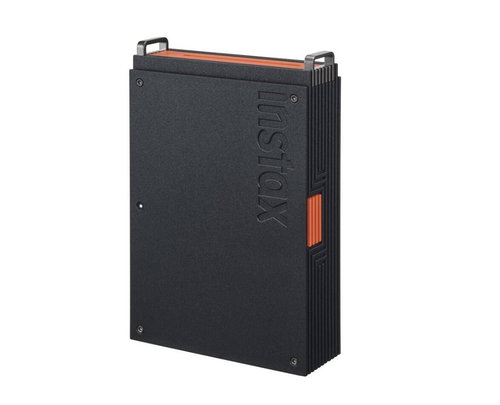
Fujifilm instax mini Link+ Black
The Fujifilm instax mini Link+ smart printer prints digital photos directly from your mobile phone's gallery or Pinterest account in just a few seconds. Thanks to its Bluetooth interface, there's no need for any cables or a connection to a PC—all you need is a smartphone with the original app, and all your unique experiences and memories will be preserved in print. With the free instax mini Link app, you can also enhance your images with various effects, captions, filters, or frames before printing, or share them with friends. The Fujifilm instax mini Link+ uses a three-colour exposure with OLED illumination and offers the typical instax mini format (6.2 × 4.6cm) with a resolution of up to 318 DPI. The images stand out with their characteristic retro look, featuring fine details and high colour saturation. The mini Link+ printer is powered by a built-in Li-ion battery, which allows you to print up to 100 photos on a single charge. The included USB-C cable is used to charge the battery.

Key Features of the Fujifilm instax mini Link+ Black Mobile Printer
- Prints digital photos directly from your mobile phone's gallery
- Option to edit and enhance images in the instax mini Link mobile app
- Fujifilm instax mini Link+ allows you to create collage prints
- Easily add advanced 3D AR effects using instax AiR Studio
- Preview your edited images in the app before printing
- Wireless connection to your phone via Bluetooth 5.1 interface
- Batch printing of up to 10 images in a row with a single click
- Integrated battery allows you to print up to 100 images on a single charge
- Design Print mode makes it easy to print images with lots of text and illustrations
Print Photos That Make an Impression
The instax mini Link+ printer allows you to easily compile and print the images you care about most. With the Simple Print function, you can easily select your favourite photos directly from your phone's gallery or Pinterest account and turn them into iconic instax mini photos measuring 6.2 × 4.6cm in seconds. You can also enhance your images using Design Print mode, which can capture very fine graphic details with high sharpness—something you'll especially appreciate when printing pictures with a lot of text and complex illustrations, such as magazines, posters, or works of art. The result is an optimal combination of precision and style that will satisfy even very demanding users.

Fast Printing with Image Preview
Add a personal touch to your instax photos using frames, stickers, or short captions. Thanks to Simulation mode, you can preview your images before you print them. View the photos in a frame, on a wall or shelf, or in a phone case and choose the option that suits you best. You can experiment not only with placement but also with style and effects, so the final photo will always match your vision. You'll also appreciate Multiple Print mode, which allows you to print up to 10 images that you've previously previewed and selected in Image Simulation mode, all in a single step. Printing one image after another saves you time and helps maintain a high creative pace.

Easily Create Collages and Group Photos
With the instax mini Link+, you can create high-quality and impressive collages. Combine multiple shots into a single instax photo to create a captivating and expressive story, whether it's photos of your friends, family, pets, or pictures from Pinterest. There's also the popular Click to Collage function, which allows you to take fun series of photos and create collages from them. Set the scene, gather your friends, and take six shots in quick succession. Then, choose the best photos and print them as a collage. Your creation will be further enhanced by a bonus animation that you'll definitely want to share. You can also easily create group photos with the printer—just set up your phone, get the group together, and trigger the shutter with the power button directly on the mini Link+ printer.

Fujifilm instax mini Link+ Captures Even the Most Elusive Moments
Using the instax mini Link app, you can easily print any scene from any video. You'll especially appreciate this feature for action videos capturing various tricks on a bike, skateboard, snowboard, etc. Even a very fleeting moment in a video can easily be turned into a sharp and stylish instax photo that you'll be happy to display and that everyone will admire.

Even More Possibilities with instax AiR Studio
In addition to standard photo edits like adjusting brightness and adding stickers or frames, the app also offers the instax AiR Studio function. This advanced technology allows you to enrich your photos with 3D augmented reality (AR) effects in real time directly while shooting. You can even stack multiple effects on top of each other to achieve the ideal result. You can also save up to 20 of your creations directly in the app for later use. The mini Link+ printer thus becomes a pocket-sized studio, ready for immediate use at any time.

The mini Link+ Offers a Range of Useful Features and Settings
The mini Link+ printer offers two optional colour profiles. If you want your final photos to stand out with rich and dynamic colours, choose instax-Rich mode. For clean and delicate tones reminiscent of classic film, select instax-Natural mode. Another useful feature is the ability to print an additional photo just by turning the printer upside down and pressing the power button for one second. You can keep one image and give the other away. Using the app, you can also take a fun test to see how compatible you are with someone. Simply fill out the questionnaire and then view the result on the printed photo.

A Compact and Easily Portable Printer
The Fujifilm instax mini Link+ has a robust and slim design in a black-and-orange finish, which allows it to fit well into any environment. Thanks to its compact design and very low weight of 240 grams, you can easily carry the printer in a handbag, travel backpack, etc. The printer's mobility is also enhanced by its Li-Ion battery, which lasts for approximately 100 photos on a full charge. The included USB-C cable enables convenient and fast charging.

Specifications
Type
Function
Connection
Printing parameters
Dimensions
Colour
Package includes
| Code: | OF952c9 |
| Warranty: | 24 months |
| Links: | Producer's Website: |